
top of page

Happy Shopping

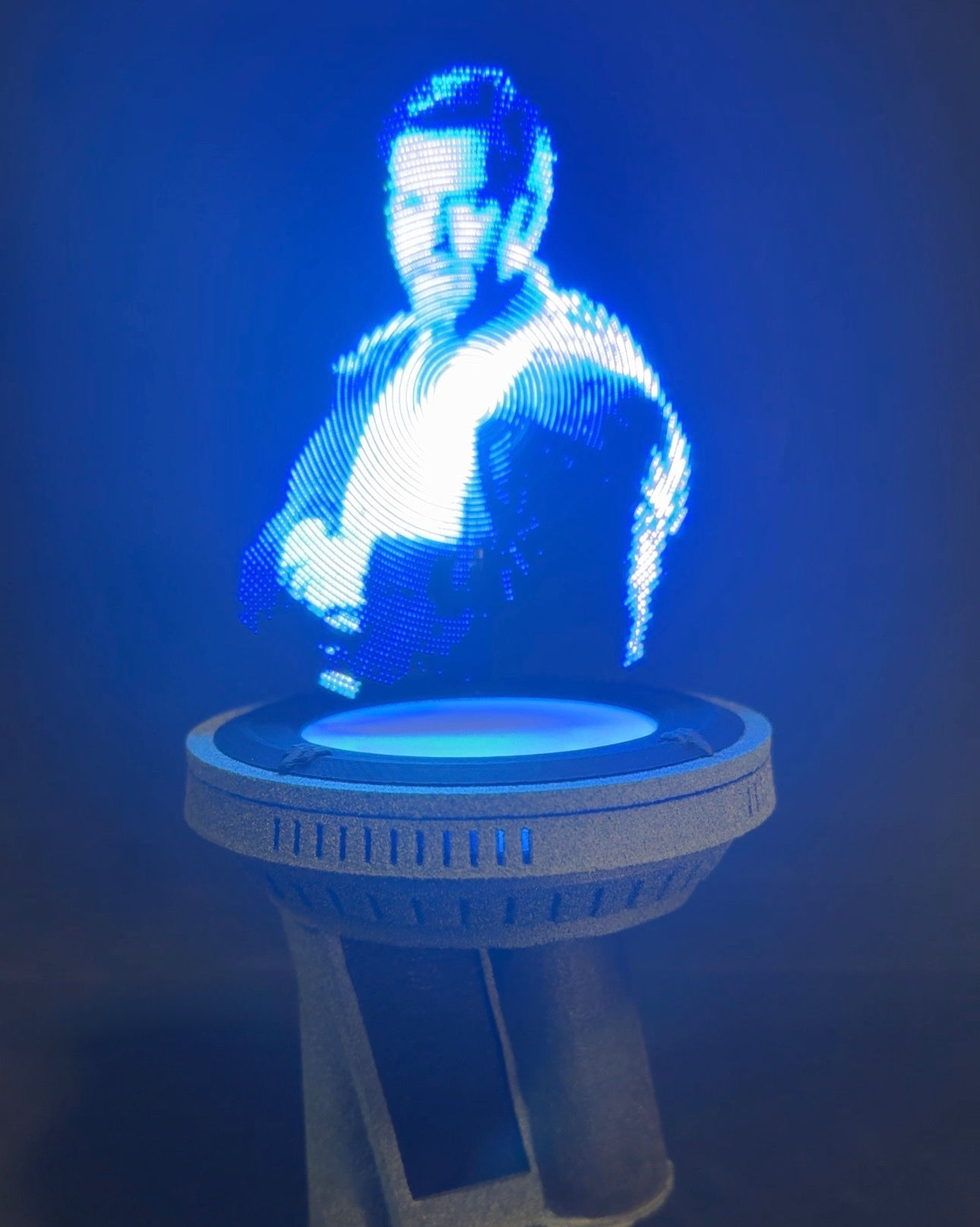
Bring a true “hologram moment” to your 1/6 display. Fusion Holo is a compact tabletop projector that creates a floating hologram-style image using a high-speed spinning LED fan, paired with a glowing LED ring base and built-in sound for extra atmosphere. The sci-fi platform features surrounding vent / hole details to match high-end collector displays.

Key Features

  • Floating Hologram Effect A high-speed LED rotor projects a crisp, “in-air” hologram look above the platform.

  • LED Ring Base Glow A clean holo light around the top ring adds depth and shelf presence.

  • Sound-Enhanced DisplayIncludes up to 30 sound scenes to match your setup.

  • Logo / Animation LibraryIncludes up to 50 hologram logos / visuals for variety.

  • USB-C Powered (5V)Simple plug-and-play power from a USB-C 5V source (wall adapter or power bank).

Specifications

  • Power: USB-C, 5V

  • Display Type: High-speed spinning LED hologram fan

  • Base Lighting: Integrated LED ring

  • Audio: Built-in sound playback

  • Content: Up to 30 sound scenes + up to 50 logos/visuals

  • Use: Collector display accessory (not a toy)

What’s Included

  • Fusion Holo projector unit (USB-C cable included)(USB-C power source / wall adapter not included unless stated in your listing.)

Quick Start (Important)

  1. Place on a stable, flat surface away from edges (a display shelf or table center is best).

  2. Clear the area above and around the rotor (keep hair, loose clothing, cables, and small objects away).

  3. Plug the unit into a 5V USB-C power source.

  4. Allow a moment for the fan to reach speed — the hologram will appear once spinning.

  5. Select your preferred logo/visual and sound scene using the unit’s controls (varies by version).

  6. To stop, unplug power and wait until the fan fully stops before moving or handling.

Safety Warnings (Read Before Use)

⚠️ High-Speed Spinning Fan — Injury Risk

  • Keep fingers, hair, and clothing away from the spinning fan at all times.

  • Do not touch the fan while powered — it spins very fast and may cause injury.

⚠️ Keep Away From Children

  • Place in a secure area away from children and pets.

  • This is a display accessory, not a toy.

⚠️ General Safety

  • Use 5V USB power only (do not exceed the rated input).

  • Keep away from water, moisture, heat sources, and dusty environments.

  • If the unit vibrates, tips, or is struck: power off immediately and inspect before reuse.

Care

  • Unplug before cleaning.

  • Use a soft dry cloth to remove dust from the base. Avoid sprays or liquids near the rotor area.

Fusion Holo Projector — 1/6 Hologram Display + Sound + LED Ring (USB-C)

AU$299.99Price
Quantity
Expected to ship 3 months after ordering
  • FUSION HOLO (Instruction Manual)

    Holographic Display - 10CM / 4.5"


    How do I power and control the Fusion Holo?

    • USB-C  cable included

    • Plug and Play - ⚠️ High-speed fan—hands off.

    • Physical remote control – Mute, play, pause, rewind with ease.


    What holograms are included?

    • Up to 30 sound scenes & Up to 50 logos


    Can I upload my own hologram files?

    Yes! If you have a compatible file format, you can load it yourself.


    Safety Precautions

    To avoid damaging yourself or the device, please follow these instructions:

    • Do not touch the fan blades whilst in motion

    • Keep the display away from water or moisture

    • Avoid contact with the speakers on the back of the display

    • Do not shake the device, as it may cause damage to the orientation gyro

    • Use the safety shield when operating around people, children or pets

    • Do not store the “Fusion Holo” in a strong magnetic field, dusty environment.


    Static crackling sound?

    You may hear a slight static sound when your device is turned on. This is from the speakers. If you need the device to be silent, please press the mute button on the provided remote.


    Unfortunately, in order to keep the size of the display portable, we have to use a smaller speaker, this usually comes at the cost of audio quality. In order to keep the device as affordable as possible, we opted for these speakers as we felt the audio quality actually enhances the "hologram" feel.

    However we are constantly looking for better alternatives to balance cost with quality as best as we can.


    📸 How to Film Hologram Fan LEDs Perfectly

    (For phones without manual settings)

    1️⃣ MUST-DOWNLOAD APPS

    • iOS: "Blackmagic Camera" (free) or "Filmic Pro" (paid)

    • Android: "Open Camera" (free) or "ProShot" (paid)

    2️⃣ CRUCIAL SETTINGS

    • Shutter Speed: 1/30 or 1/60 (matches LED refresh rate to avoid black bars/flicker)

    • ISO: 50-200 (lower = less noise)

    • Focus: Manual lock on the fan blades

    • White Balance: 5000K (neutral)

    3️⃣ LIGHTING TRICKS

    • Pitch-black room = Best hologram visibility

    • Backlight? Use a weak blue/cyan LED behind fan (enhances depth)

    • No ND filter? Cover windows with black cloth

    4️⃣ ANGLES & MOVEMENT

    • 45° side view (shows hologram depth)

    • Slowly rotate phone to match fan speed (reduces motion blur)

    ⚠️ TROUBLESHOOTING

    • "Black bars" in video? Adjust shutter speed slightly (try 1/25 to 1/100)

    • Hologram too dim? Increase ISO just enough (under 400)

  • Processing & ShippingAll of our items are lovingly made to order just for you. Please allow 4-12 weeks for creation and processing before your order ships.

    Please Note: Due to the custom nature of made-to-order items, orders cannot be canceled or refunded once the creation process has begun within this 4-12 week window.


    Once shipped, you will receive a tracking notification via email from Australia Post (auspost.com.au).

    For our customers in the USA: Once the package enters the United States, you can track it with greater detail on the USPS website.

bottom of page